Live
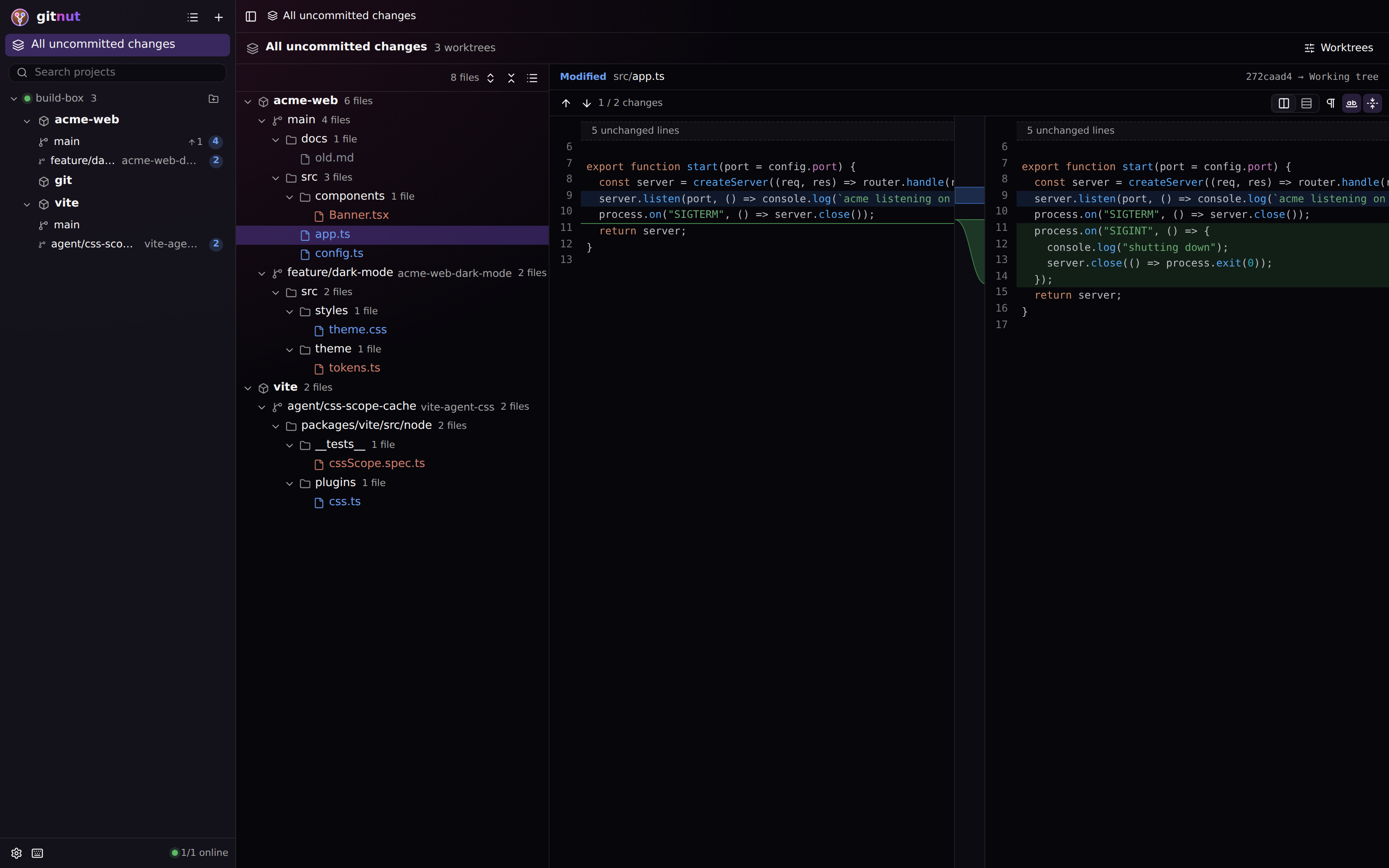
Live uncommitted changes
Every worktree's edits, updated while agents type. "All uncommitted changes" merges several projects into one tree, so three agents on three repos fit on one screen.

Claude Code, Codex, Cursor and friends write code on your laptop, a dev VPS and a dozen worktrees at once. GitNut streams every repo, branch and uncommitted change from all of your machines into one window, with the log graph and diff viewer of IntelliJ IDEA.
curl -fsSL /install.sh | shgit worktreecd into each worktree, run git status again and againIn repos and worktrees on your laptop, a VPS or a build box. Nothing to change in your agent setup.
The gitnut daemon finds the repos, polls only what you look at, and never takes a git lock, so it can't block an agent.
Changes stream over WebSocket to the desktop app, a browser tab, or a panel inside your own tool. Over localhost or Tailscale.
Review, commit, fetch, pull, push. Hide noisy repos, watch whole folders so new agent repos appear on their own.
Every worktree's edits, updated while agents type. "All uncommitted changes" merges several projects into one tree, so three agents on three repos fit on one screen.
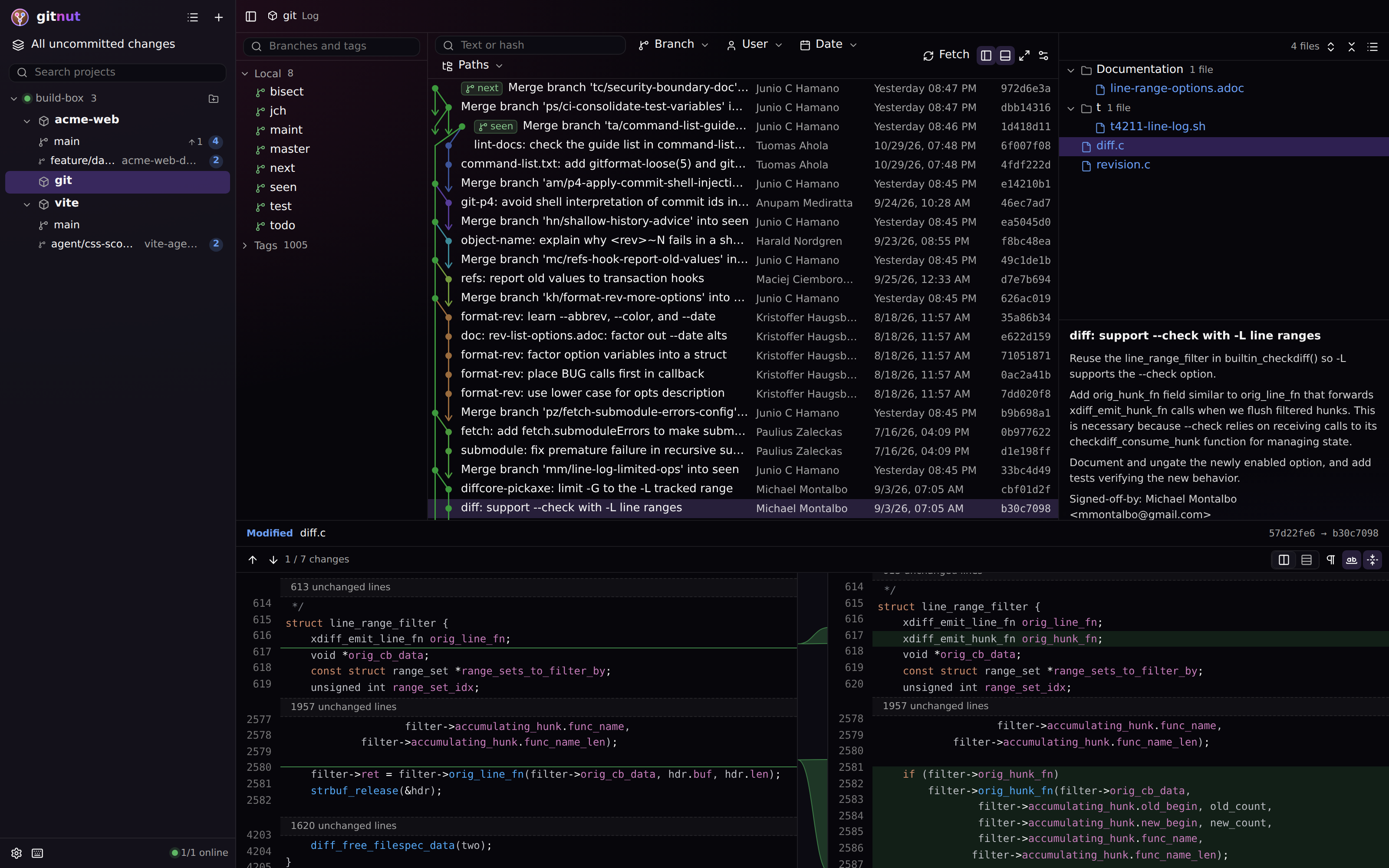
Ctrl+click the commits of one task, even far apart, and read their combined change per file, with word-level highlights and IntelliJ's connector bands.
Laptop, VPS, CI box: each runs one gitnut daemon. Group projects by server or see one flat list.
Local, remote and tag refs in one IntelliJ-style graph: same lanes, colours and long-edge arrows, smooth with 80k+ commits. See where each agent branched off and what it merged.
Every piece is a React component. Put <LocalChanges/> next to your agent's chat, or embed the whole client with an iframe.
One binary, no database, no git locks. Localhost by default, token auth and Tailscale when you open it up. Self-updates with checksums.
Building an agent UI? Drop in one component and your users see exactly what the agent changed, live, without leaving your app.
import { LocalChanges } from "@gitnut/client";

// Live uncommitted changes of the agent's worktree, next to its chat.
<LocalChanges
  server={{ url: "http://127.0.0.1:7420" }}
  worktreePath={agent.worktree}
  theme={{ colors: { primary: "#0f766e" }, radius: { md: "10px" } }}
/>The desktop app starts its own daemon and opens the client. On servers, install the CLI: it is the daemon too.
curl -fsSL /install.sh | shirm /install.ps1 | iexInstalls to ~/.gitnut/bin after checking the SHA-256. Then gitnut service install and open the URL from gitnut status. Add projects in the app.
Builds are not signed yet. macOS: run xattr -rd com.apple.quarantine /Applications/GitNut.app after copying the app. Windows: SmartScreen → More info → Run anyway.
Found a bug or have an idea? Open an issue. The README covers setup, the daemon and embedding.
GitNut is free and open source. If it saves you time, a small tip keeps it going.